"Call an Uber taxi to San Francisco Airport."

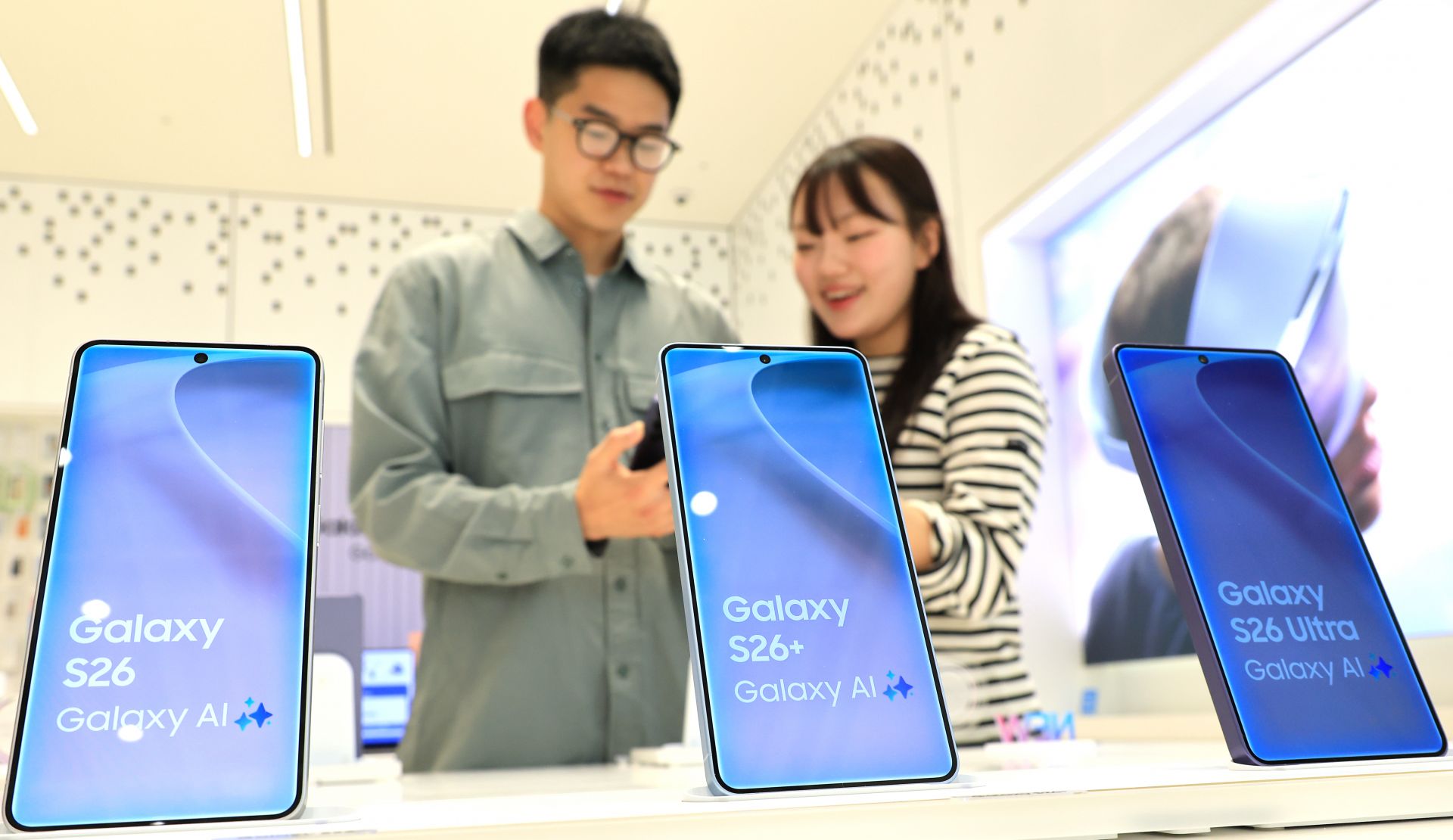
With that single phrase, the Uber application opened automatically. This is one of the new features of the Galaxy S26 series unveiled at Samsung Electronics' "Galaxy Unpacked 2026" held in San Francisco, United States, on the 25th (local time). While Gemini, Google's AI agent embedded in Galaxy, was searching for a taxi, I was able to use other apps as usual. I could check the process step by step and choose whether to stop or let it continue. Once Gemini finished searching for taxis to the airport, a notification appeared, and all I had to do was decide which taxi to select by price range and proceed with payment. The cumbersome process of launching a taxi app, searching the destination on the map one by one, and pressing buttons to call a cab was eliminated. Samsung explained that this feature will also be available in Korea through the Kakao T app.
Galaxy S26 "Now Nudge" offers personalized services using Bixby... Say it and the AI phone searches and runs it instantly
The Galaxy S26 is Samsung Electronics' 3rd-generation AI phone, with an enhanced AI agent that actively understands the user's context and intent. It is designed to blend deeply into users' daily lives, providing practical help and shortening task time to improve efficiency. The newly introduced "Now Nudge" feature is a personalized service that uses Bixby, Samsung's own agent. After checking a friend's message saying, "I want to see the photos we took on our trip to Australia," I clicked the reply input box, and a suggestion labeled "Share photos" appeared on the bottom bar. Tapping it automatically brought up the photos taken during the Australia trip, and I could immediately send them to my friend by selecting and sharing. The Now Nudge feature also reduced the sequence of steps of opening the gallery app, searching for photos, and selecting them. When I received a message asking, "Are you available for a meeting on the morning of February 27?" the AI suggested opening the calendar in a "nudge" manner, allowing me to easily check whether I already had an appointment.

A scene of calling an Uber taxi by voice command using the Gemini AI installed on the Galaxy S26. Photo by Kim Bokgyeong
원본보기 아이콘Even lowering screen brightness is now done by voice command... Remove shadows, fingers, and other unwanted elements after shooting
Users can quickly and easily change smartphone settings they need through conversations with Bixby. For example, voice commands such as "Lower the screen brightness" were also possible. This feature seemed useful when you do not know which menu to open in the Settings app. The newly added "Creative Studio" feature allowed users to turn desired photos, such as pictures of a dog, into characters, create emojis that can be used on social media (SNS), and use them like stickers. The scan feature also looked practical when you wanted to capture and save a document cleanly. After launching the camera app and shooting using the "Scan" menu, shadows, fingers, and other unnecessary elements were automatically removed and the result was provided as a PDF file.

An AI image editing tool newly introduced on the Galaxy S26 turned a partially eaten slice of cake into a whole cake with a single voice command. It is also possible to transform a single slice of cake into a whole cake. Reporter Kim Bokgyeong
원본보기 아이콘Say "Call me a taxi" and the "AI phone" will handle it all... "Privacy Display" delivers rock-solid screen security
The "Privacy Display," introduced for the first time in the global mobile industry, was also a standout feature. If you were worried about others peeking at your phone screen in cramped spaces such as subways or elevators, this feature can ease that concern. When I pulled down the top bar from the home screen of the Galaxy S26 Ultra, the Privacy Display menu appeared, and I could selectively apply this feature to only the applications or notification windows I wanted. When I changed the angle of the phone, the screen darkened, making it difficult for the person next to me to see it with the naked eye.

Turning a slice of cake into a whole cake... Change a selfie taken in Busan to a San Francisco backdrop
The advanced AI capabilities for realizing imagined images delivered even more astonishing innovation. With a single spoken command, it turned a cake with only one slice left into a whole cake, and transformed a plain fresh-cream cake into a pink strawberry cake. After taking a selfie, I could change the background to a night view of San Francisco, and a newly introduced feature allowed me to combine two photos into one. On the Galaxy S26, AI functions that transform images exactly as I want and imagine them have been realized. It was easy to revert to a previous version of the image, and I could make multiple edits using the "Continue editing" function. However, tasks related to portrait rights, such as changing the image to a specific person's face, were not possible.

-
Reporter Kim Bokyung bkly477@asiae.co.kr
-
Edit Yang Hyejin adoretj@asiae.co.kr
© The Asia Business Daily(www.asiae.co.kr). All rights reserved.

![[Exclusive] "Looking Beyond Financial Statements for Future Value"... IBK Injects 170 Billion Won into 72 Innovative Companies](https://cwcontent.asiae.co.kr/asiaresize/304/2026011314545989464_1768283699.jpg)